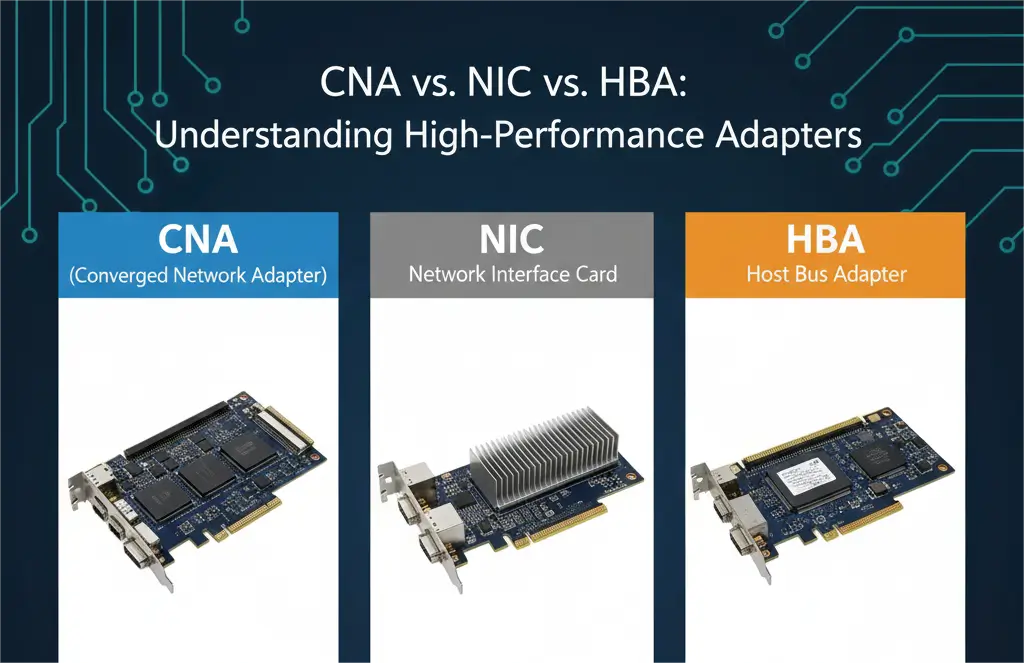

A network interface card (NIC) handles Ethernet networking, a host bus adapter (HBA) connects a server to a storage fabric or storage device, and a converged network adapter (CNA) can present network and storage functions over a converged Ethernet path when the adapter, switch, operating system, drivers and selected protocol all support that design. A CNA is therefore a fit decision, not an automatic replacement for every NIC and HBA.
For architects comparing CNA vs NIC vs HBA, the decisive questions are not simply port speed or adapter count. Start with the traffic protocol, the way the operating system must see the device, the capabilities of the upstream switch, the required failure domains and the physical link. This guide explains those differences and turns them into a practical server I/O selection process.
NIC vs HBA vs CNA: The Short Answer
Choose a NIC when the server primarily needs Ethernet connectivity. A standard NIC carries Ethernet frames and commonly supports IP workloads such as application traffic, management, iSCSI and NVMe/TCP. Features vary by model: checksum and segmentation offloads are common, while RDMA, hardware storage offload, SR-IOV and advanced telemetry must be confirmed in the adapter specifications and driver matrix.
Choose an HBA when the server needs a dedicated storage interface. In enterprise SAN discussions, HBA usually means a Fibre Channel adapter that logs in to a Fibre Channel fabric and presents storage through a storage-oriented driver stack. The term can also describe SAS adapters, so procurement documents should name the protocol rather than relying on “HBA” alone. A dedicated Fibre Channel HBA keeps LAN and SAN operations, tooling and failure domains clearly separated.
Choose a CNA when an approved converged design intentionally combines Ethernet networking and storage traffic on compatible Ethernet ports. The traditional example is FCoE: a CNA can expose Ethernet functions and Fibre Channel functions while the wire carries both over a suitable Ethernet fabric. That can reduce interface and cabling complexity in the right architecture, but it also makes switch configuration, firmware compatibility, traffic engineering and operational ownership more important.
CNA vs NIC vs HBA Comparison Table
| Decision factor | NIC | HBA | CNA |
|---|---|---|---|
| Primary role | Ethernet network connectivity | Dedicated storage connectivity, commonly Fibre Channel or SAS | Converged Ethernet network and supported storage functions |
| OS presentation | Ethernet interface; optional virtual functions or offloads | Storage adapter and storage targets or logical units | May present both Ethernet interfaces and virtual Fibre Channel HBA functions |
| Common protocols | Ethernet, IP, TCP/UDP, iSCSI, NVMe/TCP; RoCE on supported models | Fibre Channel, NVMe/FC or SAS according to adapter type | Ethernet plus FCoE; other offloads depend on the exact product |
| Fabric or switch dependency | Standard compatible Ethernet switching; special features may add requirements | Compatible storage fabric or direct-attached storage | Compatible converged switches, DCB policy and FCoE support for traditional CNA use |
| Typical physical media | RJ45, DAC, AOC or pluggable optics, depending on port | DAC or optical Fibre Channel links; SAS copper for SAS HBAs | DAC, AOC or Ethernet optics supported by both adapter and switch |
| Main strengths | Broad Ethernet support, familiar operations and flexible IP storage | Purpose-built storage behavior and independent SAN operations | Consolidation when the full converged architecture is validated |
| Best-fit environment | General servers, IP networks, Ethernet storage and RDMA-capable designs | Established Fibre Channel SANs or dedicated storage paths | Approved FCoE or converged platforms with compatible lifecycle support |
The table describes roles rather than universal performance rankings. Latency, throughput and CPU usage depend on the adapter silicon, queue design, firmware, driver, PCIe generation, NUMA placement, switch policy and workload. Compare tested configurations at the required packet size and storage queue depth instead of assuming that one adapter class is always faster.
When Should You Choose Each Adapter?
A NIC is the default choice when applications use ordinary Ethernet and IP. It is also sufficient for many storage deployments: iSCSI and NVMe/TCP operate over IP, and supported RDMA NICs can carry RoCE. If the organization already manages Ethernet end to end, a capable NIC may provide the simplest lifecycle, provided its speed, queue resources, offloads and high-availability design meet the workload.
A Fibre Channel HBA remains appropriate when the server must join an existing FC SAN, storage zoning and multipathing are established operational practices, or LAN and SAN teams require independent change control. It can also be the safer option when a validated application stack specifies exact HBA firmware and driver versions. Keeping storage on separate ports may use more adapters and cables, but it can make troubleshooting and maintenance boundaries clearer.
A CNA is strongest when convergence is an explicit platform requirement rather than a generic cost-saving assumption. Confirm that the server vendor supports the CNA, the switch supports the required converged features, the operating system supports the intended network and storage functions, and the storage vendor certifies the entire path. Also confirm how redundancy works: two physical ports are not automatically two independent failure domains if they share one adapter, PCIe slot or upstream switch.
For a new data center network, compare separate and converged designs against the same requirements: availability, switch port count, rack cabling, power budget, operational skills, vendor support period and recovery procedures. The preferred architecture is the one the team can validate and operate reliably throughout its lifecycle.
Protocol Reality: FCoE, iSCSI, RoCE and NVMe/TCP
FCoE carries Fibre Channel frames over a suitable Ethernet fabric and is the traditional CNA use case. A production FCoE path normally depends on compatible data center bridging features and coordinated configuration across the CNA and switches. It should not be treated as ordinary best-effort Ethernet. Verify priority handling, congestion behavior, fabric login, zoning, multipathing and failover before deployment.
iSCSI is IP storage and can run on a standard Ethernet NIC. Some adapters provide iSCSI boot or protocol offload, but those features are model- and driver-specific; the word CNA does not guarantee them. Network isolation, multipathing, queue sizing and congestion management still matter even when storage shares an Ethernet fabric.
RoCE provides RDMA over Ethernet and is not the same protocol as FCoE. It requires an RDMA-capable NIC or adapter and a correctly engineered network. Depending on the design, that may include ECN, priority flow control and careful buffer or traffic-class configuration. Do not label every RDMA adapter a CNA without checking how the vendor presents and supports its functions.
NVMe/TCP runs over TCP/IP and does not by itself require a traditional FCoE CNA. A supported Ethernet NIC can carry it, while higher-end adapters may accelerate parts of the data path. NVMe/FC is different: it maps NVMe onto Fibre Channel and uses compatible FC infrastructure. Naming the exact transport prevents a common purchasing error in which “NVMe support” is assumed to mean the same network requirements for every implementation.
Cabling and Optics Planning
After selecting the adapter function, design the physical link from both ends. Record adapter model, switch model, port form factor, supported data rate, lane configuration, encoding, reach and connector type. A link can be mechanically pluggable yet fail because the host rejects the coding, the speed is unsupported, the forward-error-correction settings differ or a breakout mode is not enabled.
For short in-rack links, direct-attach copper cables can offer a simple, low-power connection when both ports support the cable assembly and the distance is within specification. AOC and DAC assemblies cover different reach, bend, weight and power needs; the practical differences are summarized in this AOC, DAC and transceiver comparison.
For structured cabling, longer reach or patch-panel flexibility, use supported optical transceivers with the correct fiber type, wavelength, connector and polarity. Confirm host coding and diagnostics requirements before ordering. The SFP module selection guide provides a useful checklist, but the server adapter and switch compatibility matrices remain the controlling references.
Do not choose a link solely because its advertised maximum speed exceeds the current requirement. Match the real port mode and planned upgrade path. A 10, 25 or 32 Gb/s interface can be correct for one design, while 100 Gb/s or faster may be justified elsewhere. The protocol, lane mapping and supported media determine compatibility, not a blanket rule that CNAs require the highest available speed.
Server I/O Deployment Checklist
- Name the workloads and transports. List application Ethernet, management, storage, backup and cluster traffic, then identify FCoE, Fibre Channel, iSCSI, RoCE, NVMe/TCP or NVMe/FC explicitly.
- Check the server platform. Verify PCIe generation, lane width, slot placement, power, airflow, NUMA locality, supported firmware and operating-system drivers.
- Check the fabric. Confirm switch port mode, DCB or RDMA policy where applicable, VLAN or VSAN design, zoning, multipathing and congestion controls.
- Define independence. Map adapters, ports, switches and power domains so a single component failure does not defeat the intended redundancy.
- Specify the physical link. Record form factor, speed, lanes, reach, connector, fiber or copper type, FEC and host coding for each endpoint.
- Test the lifecycle. Validate boot, firmware upgrades, failover, recovery, monitoring and vendor escalation with production-like traffic before rollout.
Ask vendors for an interoperability statement that names the full path rather than approving only an adapter part number. A supported CNA with an unsupported switch configuration is not a supported solution. The same rule applies to NICs, HBAs, cables and optics.
Conclusion
The practical CNA vs NIC vs HBA decision begins with protocol and operations. Use a NIC for Ethernet and IP-based services, use an HBA for a dedicated supported storage path, and use a CNA when a validated converged architecture genuinely benefits from combined functions. None of the three is universally superior; the right choice is the one whose server, fabric, driver and physical-link dependencies are documented and tested.
Need help specifying the link? Contact PHILISUN with the adapter model, switch model, protocol, speed, distance, coding and operating environment. We can help identify a compatible cable or optical path for evaluation.
Frequently Asked Questions
Is a CNA the Same as a NIC?
No. Both use Ethernet physical interfaces in many deployments, but a CNA is designed to present supported converged network and storage functions. A standard NIC primarily presents Ethernet networking, although advanced NICs may add RDMA or storage offloads. Always compare the exposed operating-system functions and supported protocols for the exact model.
Does a CNA Always Replace a Fibre Channel HBA?
No. A CNA may provide virtual Fibre Channel functions for FCoE in a compatible converged design, but a native Fibre Channel SAN can still require dedicated FC HBAs. Vendor certification, switch architecture, operational separation and the planned storage transport determine whether replacement is appropriate.
Can a Standard NIC Carry iSCSI, RoCE or NVMe/TCP?
A standard Ethernet NIC can carry iSCSI and NVMe/TCP because both use IP. RoCE requires an RDMA-capable adapter and a correctly configured Ethernet network. Hardware acceleration, boot support and queue capabilities vary, so confirm them in the adapter, driver and operating-system documentation.
How Do I Choose DAC, AOC or Optical Modules for a Server Adapter?
Start with the adapter and switch compatibility lists, then match form factor, speed, lane mode, reach, connector, FEC and coding. DAC commonly suits short copper links, AOC provides a lightweight fixed optical assembly, and separate modules plus fiber support longer reach and structured cabling. Validate the exact assembly in both endpoints before deployment.