Enterprise LAN Fiber Cabling Solutions
PHILISUN enterprise LAN fiber cabling solutions provide structured backbone, equipment-room and work-area connectivity for intelligent offices, campuses and smart buildings that need reliable voice, data, Wi-Fi, security and automation networks.
Enterprise LAN Fiber Cabling Solutions for Smart Buildings
PHILISUN enterprise LAN fiber cabling solutions help offices, campuses, schools, hotels, hospitals and intelligent buildings build reliable backbone and equipment-room connectivity. The solution combines optical transceivers, LC patch cords, MPO trunk cabling, patch panels, pigtails, labeling and test documentation so the network can support voice, data, Wi-Fi, security, building automation and future bandwidth upgrades.
| Enterprise LAN requirement | Recommended PHILISUN solution | Planning notes | Start here |
|---|---|---|---|
| Building or campus backbone | OS2 single-mode or OM4/OM5 multimode fiber, MPO trunks and patch panels. | Choose fiber type by distance, bandwidth target, pathway space and future upgrade plan. | MPO Cable Assemblies |
| Equipment room and floor distribution | Fiber patch panels, LC duplex patch cords, pigtails and labeled cross-connects. | Plan port count, cabinet layout, cable labels, spare fibers and maintenance access before installation. | Fiber Patch Cords & Pigtails |
| Switch uplinks and server access | SFP, SFP+, SFP28, QSFP and RJ45 SFP transceiver options. | Match speed, reach, wavelength, connector, fiber type and switch compatibility. | Optical Transceivers |
| High-density expansion | MPO trunk cables, cassette modules and structured cable routes. | Use MPO when fiber count, rack density and future parallel optics matter. | MPO Trunk Cable |
| Acceptance and maintenance | Insertion loss, return loss, polarity, labeling and OTDR documentation. | Standardized records make troubleshooting and future moves/adds/changes easier. | OTDR Testing Guide |
How to plan an enterprise LAN cabling BOM
- Map the building zones: campus backbone, equipment room, telecom rooms, vertical trunks, horizontal cabling and work areas.
- Choose fiber type: OS2 for longer backbone and campus links, OM3/OM4/OM5 for short-reach multimode LAN links.
- Confirm switch interfaces: SFP, SFP+, SFP28, QSFP and RJ45 SFP ports need matching transceiver type, speed and fiber connector.
- Plan cross-connects: define patch panel capacity, LC/MPO adapter type, pigtail structure, cable route and spare ports.
- Standardize documentation: include cable labels, color code, test report format, packaging groups and maintenance records.
| Network area | Fiber cabling role | Common products | Related guide |
|---|---|---|---|
| Campus or building group subsystem | Inter-building and main backbone fiber routes. | OS2 fiber, MPO trunks, outdoor or protected cable assemblies and patch panels. | Structured Cabling Guide |
| Equipment room subsystem | Main equipment, switches, routers and distribution frames. | Optical transceivers, LC patch cords, pigtails and fiber patch panels. | SFP Port Guide |
| Vertical trunk subsystem | Fiber backbone between floors and telecom rooms. | Riser-rated fiber, MPO trunks, LC cassettes and labeled backbone links. | Fiber Optic Network Solutions |
| Management subsystem | Patch panels, adapters and records for moves, adds and changes. | LC/SC adapters, patch cords, pigtails, labels and test reports. | Fiber Optic Color Code |
| Horizontal and work area subsystem | Access links for workstations, Wi-Fi APs, security and automation devices. | Fiber or copper handoff, short patch cords, media conversion and SFP modules. | Fiber Optic Products |
For a faster enterprise LAN recommendation, send the building layout, cabinet locations, floor count, link distance, target speeds, fiber type, switch model, port count, patch panel requirement, label format and test report standard. PHILISUN can help convert the cabling design into a practical BOM for procurement and installation. For project support, contact PHILISUN.
Enterprise LAN Fiber Cabling FAQ
What is an enterprise LAN cabling solution?
An enterprise LAN cabling solution is the structured physical network that connects equipment rooms, floor distribution areas, switches, servers, Wi-Fi access points, security systems and work areas. It usually combines fiber backbones, patch panels, transceivers and copper or fiber access links.
When should an enterprise LAN use fiber instead of copper?
Use fiber when the link distance, bandwidth, EMI environment, backbone role or future upgrade plan exceeds what copper cabling can handle efficiently. Fiber is common for campus links, building backbones, switch uplinks and high-speed equipment-room connections.
Which fiber products are used in enterprise LAN backbones?
Common products include OS2 or OM4 fiber assemblies, MPO trunk cables, LC patch cords, fiber patch panels, pigtails, adapters and optical transceivers. The final choice depends on distance, speed, connector type and switch compatibility.
How do I plan patch panels and equipment-room cabling?
Plan the cabinet layout, port count, adapter type, fiber count, spare capacity, route labels and test records before ordering. The equipment room should make daily patching and future expansion clear instead of hiding unmanaged cable routes.
What information is needed for an enterprise LAN quote?
Send the building layout, link distances, required speed, switch model, fiber type, connector type, patch panel quantity, cable length, label format, packaging needs and testing requirements.
Generic Cabling System
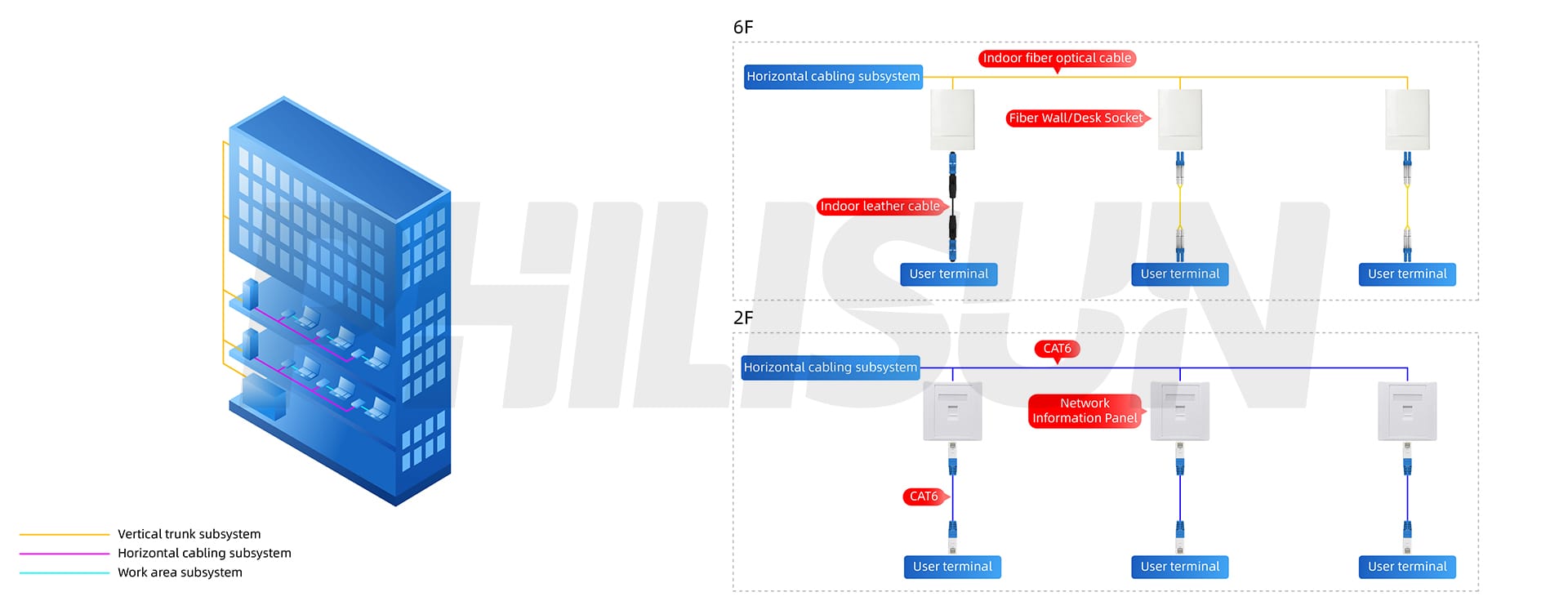
The generic cabling system is a transmission network installed in a building or buildings. It can support the voice, data system, and the automated management system in the building, and realize the resource sharing of the local area network and the wide area network. With the high popularity of networks, people have higher requirements for transmission networks and integrated cabling. Compared with the previous cabling, the generic cabling system has the characteristics of clear structure, strong flexibility, modularization, and easy expansion.
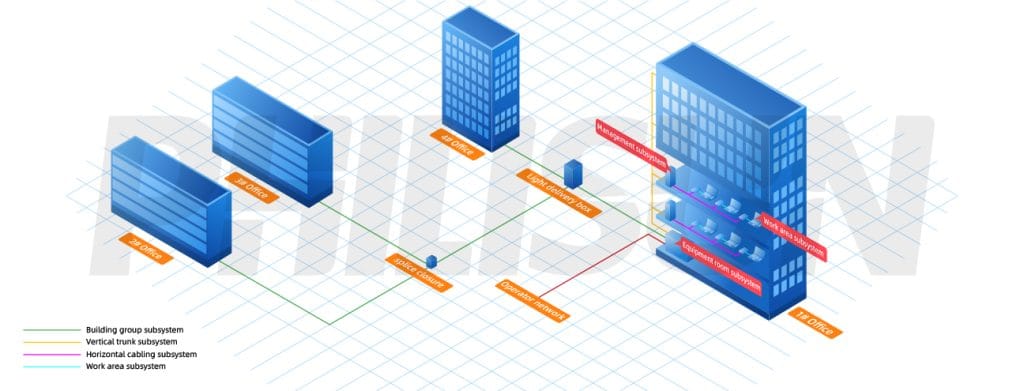
Building Group Subsystem
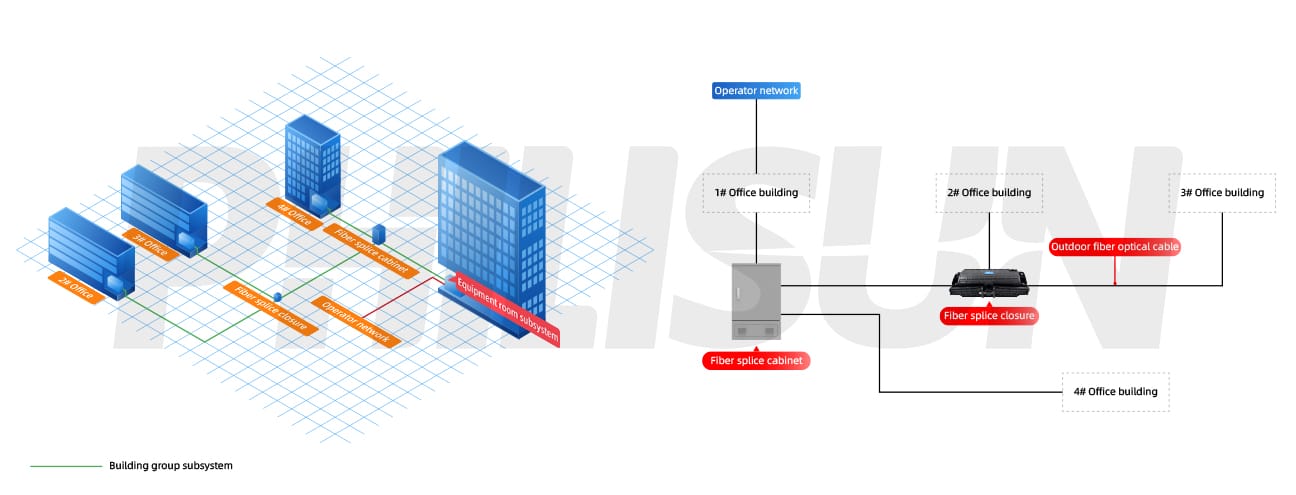
Equipment Room Subsystem
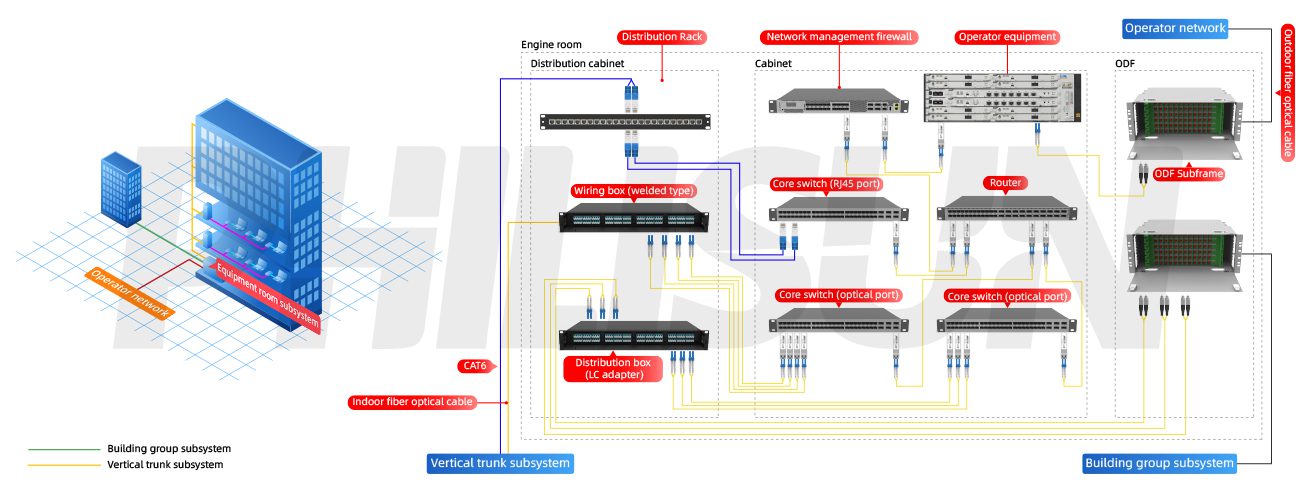
Vertical Trunk Subsystem
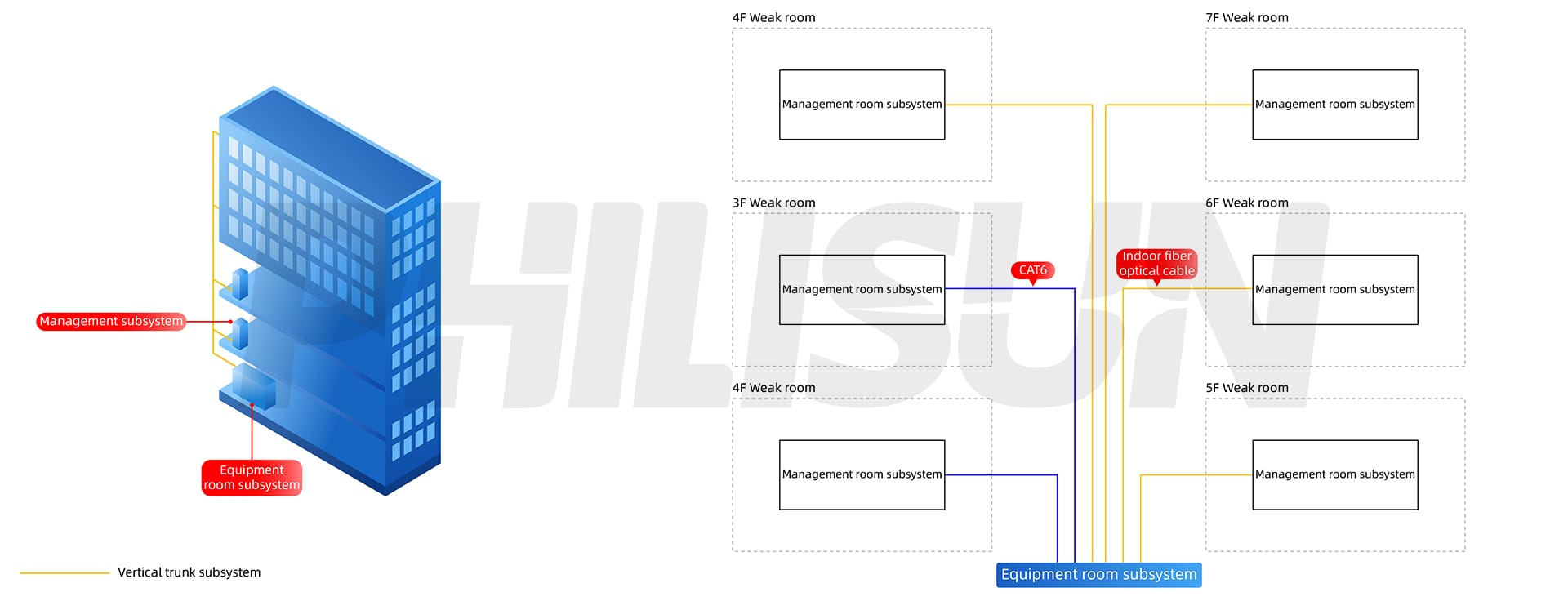
Management Subsystem
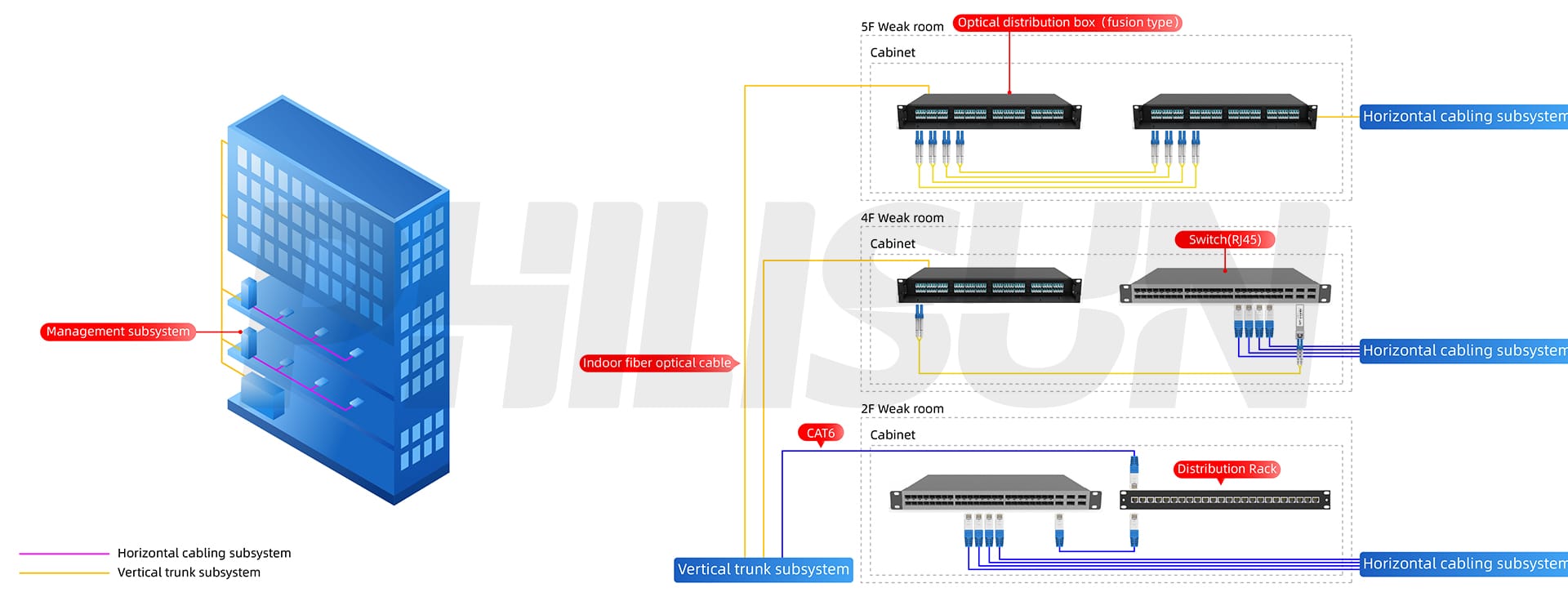
Horizontal Cabling Subsystem
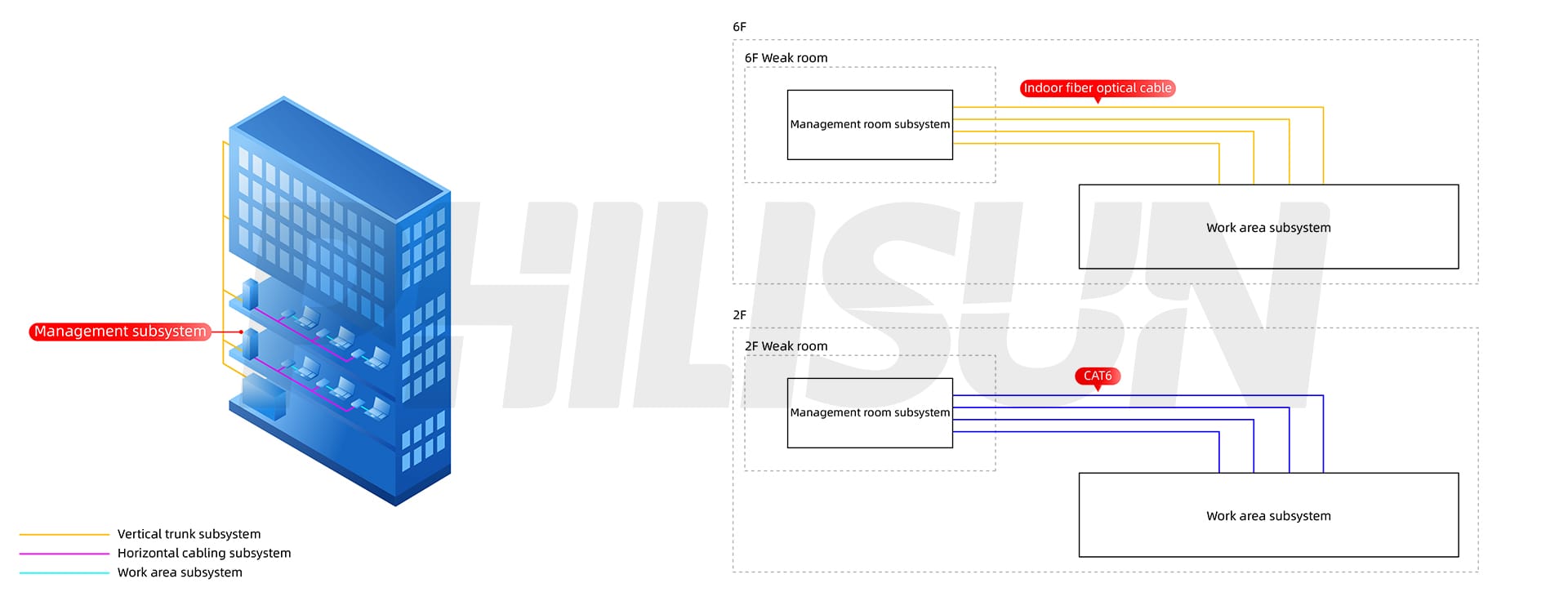
Work Area Subsystem